What is a Verified Account?
A Verified Account is a free account you can set up with Zonos. It gives you free tools to collect the additional U.S. product data now required on postal shipments, including Section 232 metal origin details needed to avoid high default tariff rates, FDA and CPSC information, and free trade agreement documentation. It also handles prepaid duty billing for U.S. postal shipments and includes free tools to calculate U.S. duties and get HTS codes.
If you already have a Verified Account for Australia Post billing, the new data collection tools are included in your existing account at no extra cost and allow you to add the new product-specific information the US now requires.
Lower duty costs
Reduce delays at customs
Support Free Trade Agreements (FTAs)
Add Section 232 data
Add FDA, CPSC, and other PGA data
What you get
How it works
- Create your Zonos Verified Account and enter your AusPost shipper number (MLID, APCN, or APBCN) to link your account.
- Connect your product Catalog—Zonos flags which products need more U.S. customs data (Section 232 origin details, FDA/CPSC information, trade agreement documentation) and you add it once.
- That data travels with every shipment, and Zonos handles filing it with AusPost for smooth customs clearance.
- Zonos bills you for the associated duty and postal clearance fees on shipments under $2,500 USD.
How much does it cost?
There are no subscription costs.
There is a postal clearance fee charged per shipment, which varies by post. You can view yours during the sign-up process (after creating the account, you can view it in your Dashboard's Billing Settings, under Plan.)
While Zonos offers other subscription-based ecommerce solutions, you do not need them. All you need is your free Verified Account.
What you need to do to ship postal to the U.S.
Six steps. Steps 1 through 4 are one-time setup. Steps 5 and 6 are what happens on every shipment.
| Step 1 (one-time setup)
Create a free Zonos Verified Account
This step now also collects the business information used by the U.S. product data tools described below, so nothing extra is required to turn on Catalog, Zonos Clarify, or document upload once your account exists.
- Follow your referral link from AusPost's email, or click "Sign up today" below.
- Create your account. Sign up with your Google or Microsoft account (or enter your information manually), enter your business information and click "Continue to Dashboard Lite." At this point, you have an account, but it isn't verified until you complete the next step.
- Add a payment method and your Australia Post shipper number (MLID, APCN, or APBCN) to turn your account into a Verified Account. View the FAQs below if you're unsure where to find these.
- If you have multiple shipper numbers, you need to follow these steps to create a Verified Account for each one.
After successfully completing these steps, congrats! You now have a Zonos Verified Account. This account enables AusPost to accept your U.S.-bound packages, knowing that the requirement for duty payment will be fulfilled. Zonos will bill you for the duties and postal clearances fees on each shipment tied to your Verified Account.
| Optional
Use free Zonos tools to calculate duty costs
So you can add them to your shipping/product prices
If you aren’t already including duty costs at checkout, Zonos' free tools can help you calculate them. After you’ve calculated the duties and fees, you can adjust product prices or shipping prices so shoppers pay the duties upfront.
This way, when you’re billed for the duty costs associated with your U.S. shipments, you’ll have already collected it and have it ready to pay.
Your Verified Account does not integrate with your ecommerce website to collect duties from your shoppers at checkout. It's only purpose is to allow you to continue shipping to the U.S., as a means to pay U.S. duties when required.
| Step 2
NEW
Connect your Catalog once
You have two ways to do this:
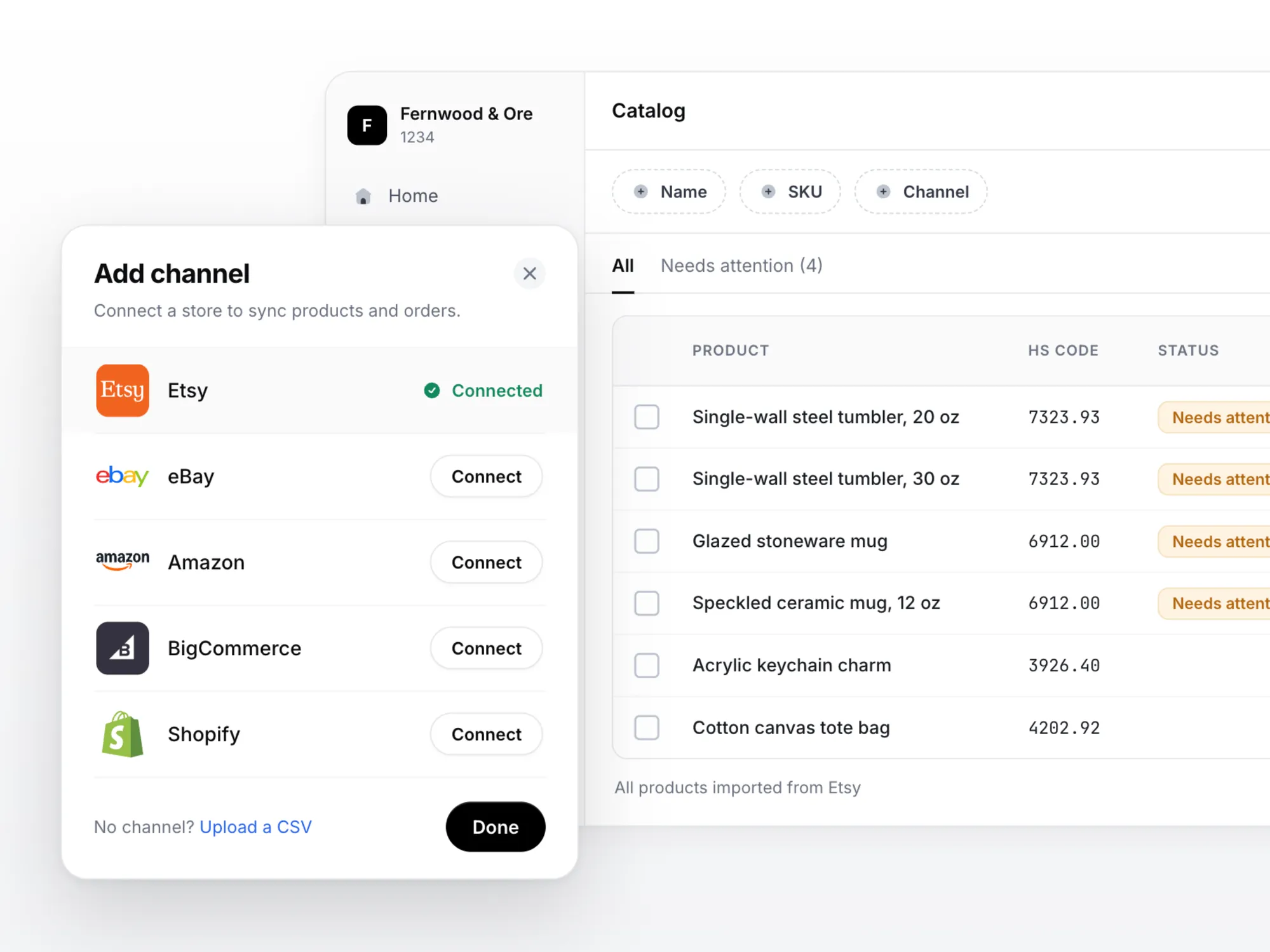
Download Zonos Sync and connect your store. Your products and orders sync automatically, so Zonos always has the order and shipment data it needs to match against what Australia Post sends over—no extra step later. Etsy, eBay, and WooCommerce connections are available now, followed by Amazon, Shopify, BigCommerce, and more.
Either way, Zonos then knows what you sell, and can tell you which items need more information before they can be shipped to the U.S.
| Step 3
NEW
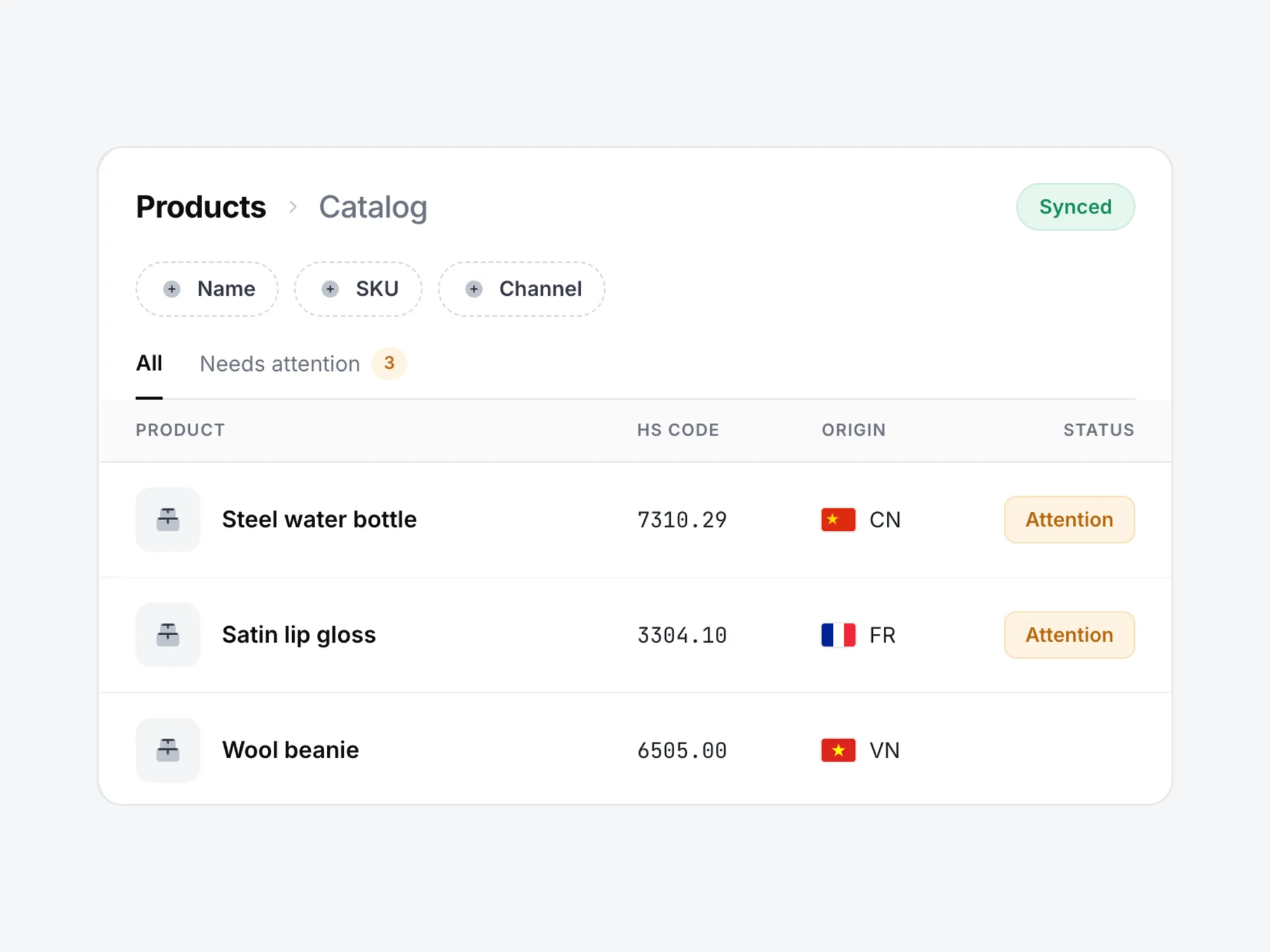
See which products need more data
Zonos checks every product in your Catalog and flags the ones that need attention, with the reason attached—melt and pour data for a steel water bottle, FDA details for a lip gloss. Anything without a flag is good to go.
The checks cover both sides of U.S. entry: the agencies that control what is allowed in, such as the FDA and CPSC, and the tariff programs that decide what you pay, such as Section 232.
| Step 4
NEW
Add the details for the flagged products
There are two ways to fill the gaps, and both save what you provide to the product so you never answer twice.
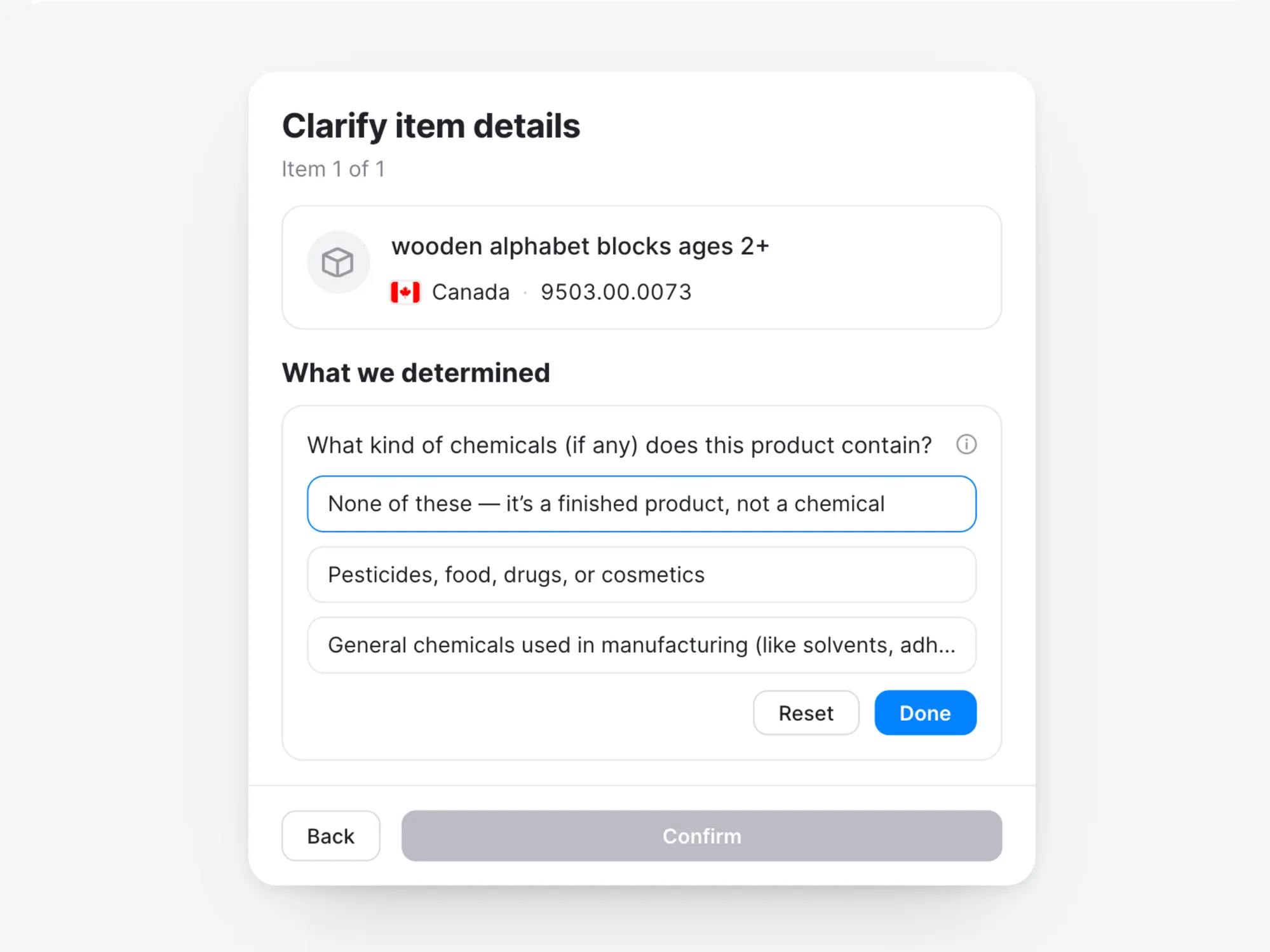
Zonos Clarify Zonos AI tells you what each flagged product is actually required to provide. Working that out yourself is possible, but slow: the requirements sit with different agencies and differ product by product. Clarify Zonos AI does it for you, and puts the questions in front of you—inferring likely answers from the product information you already have, so you review and correct instead of starting from scratch.
For requirements that paperwork satisfies, you can upload documents directly to your Catalog: certificates of origin, metal origin records for Section 232 metal goods (melt and pour for steel, smelt and cast for aluminum), and trade agreement documentation. Upload a document once and link it to every product it covers.
| Step 5
Ship your packages to the U.S.
Ship your packages as you normally do (and from the same systems that you normally ship from). Australia Post will send shipment data to Zonos for all shipments processed using your business account.
Once the shipment arrives, you don’t have to worry about your U.S. customer refusing delivery because of extra duty costs being due—with this method, they won’t be asked to pay anything more during delivery.
| Also included
NEW
Zonos comes to you when a detail is missing
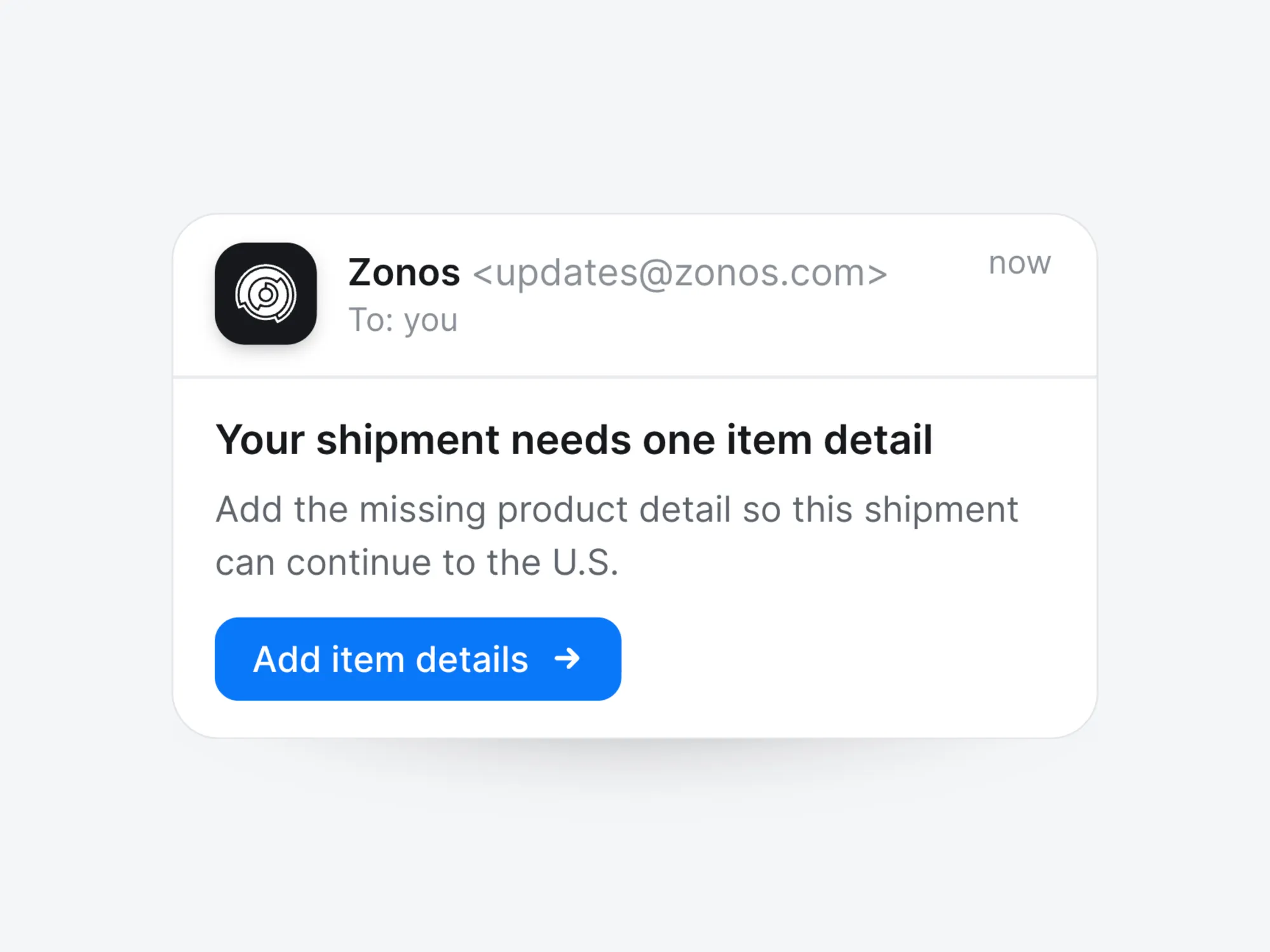
You do not have to keep the Catalog perfect on your own. Zonos checks each U.S.-bound shipment against what you have already provided, and if something is missing, emails you a link to the one question that needs answering. Your answer is saved to the product, so it is not asked again.
| Step 6
Pay U.S. duties
Zonos will bill you daily for the duty (and associated postal clearance fees) on shipments associated with your Zonos Verified Account (this means any shipments valued $2,500 USD or less sent to the U.S. via Australia Post). Zonos bills you within 24 hours of getting the shipment data from Australia Post (note that this can be several days after you ship). You can view these invoices in your Dashboard.
Zonos is the trusted leader in cross-border technology.
For more than 16 years, we’ve been powering international commerce by classifying products with HS codes and calculating duties and taxes with accuracy and reliability. Today, our technology supports some of the world’s largest brands, logistics providers, and thousands of ecommerce businesses.
Our mission has always been to increase trust in cross-border trade by making cross-border simple, transparent, and compliant. From APIs that integrate directly with custom setups to checkout experiences that make duty and tax collection easy for anyone, Zonos ensures international customers have good delivery experiences, building your brand in the process.
When will Australia Post's solution be in place, and when will services resume for the US and its overseas territories?
Australia Post has resumed shipments to the U.S.
Can I still send letters and documents?
Yes. Letters and documents of no commercial value are not impacted by the suspension. However, you must still declare a value (minimum AUD$1.00) when lodging.
What is a bona fide gift?
Bona fide gifts valued under USD$100 are not impacted by the suspension. These items must comply with declaration requirements.
CBP defines a "bona fide gift" as an item previously owned by a donor and given outright without compensation. Items acquired by purchase, barter, or as "bonus" items are not considered bona fide gifts.
- Individual to individual: The parcel should be clearly marked as a gift. CBP generally recognizes gifts not exceeding USD$100 in value.
- Business to individual: CBP generally does not recognize these as bona fide gifts. However, if it is a true gift, the parcel should be marked as such and include a statement.
To send a bona fide gift, select the gift category on the customs declaration. Zonos or a CBP-approved third party is not required.
Can I still provide a 6-digit HS code, or is a 10-digit HTS code required?
Yes. Customers can continue using a 6-digit HS tariff code.
A 10-digit HTS code will not be required until 28 February 2026.
What if the Country of Origin (COO) is the US?
Goods with a US Country of Origin (COO) are not subject to Section 122 tariffs. In the Zonos dashboard, US COO items will show 0% tariff for the postal channel.
Where do I find my APCN?
For MyPost (MP) account holders, your Australia Post Customer Number (APCN) is a unique number associated with your MyPost account.
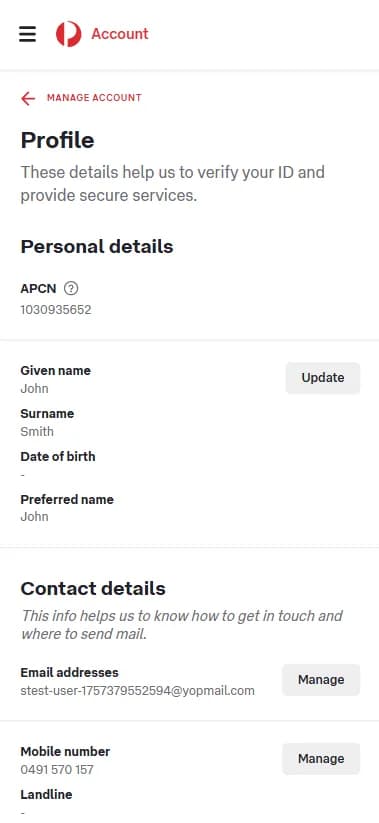
Your APCN is located in your MyPost (MP) profile, under Personal details.
Choose whether you are using a mobile or desktop device to view step-by-step instructions.
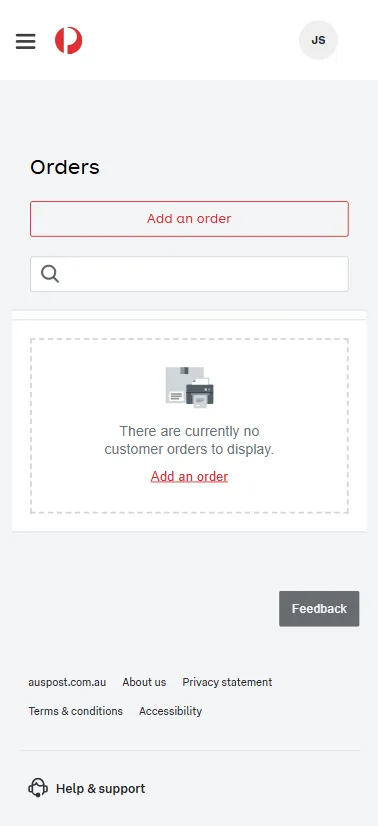
Step 1: In your MyPost (MP) dashboard, click your Profile icon (your initials at the top right of the screen).
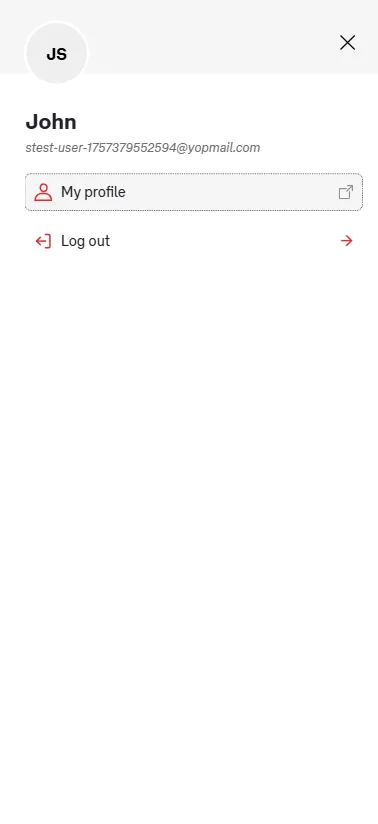
Step 2: Click on My profile in the menu.
Step 3: You'll see your APCN under Personal details on your profile page. Copy this number into your Zonos Dashboard.
Where do I find my APBCN?
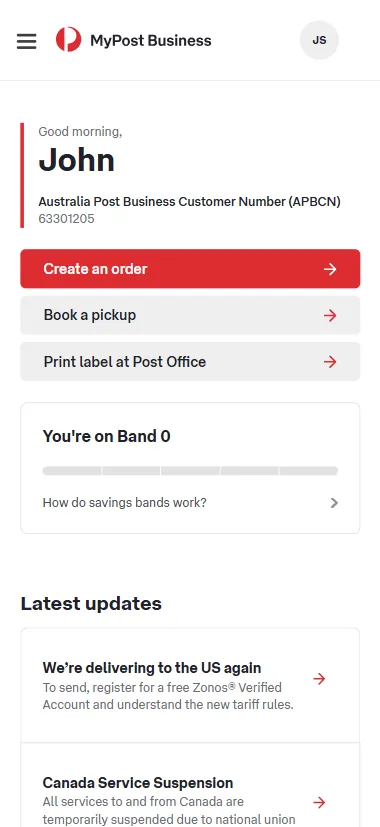
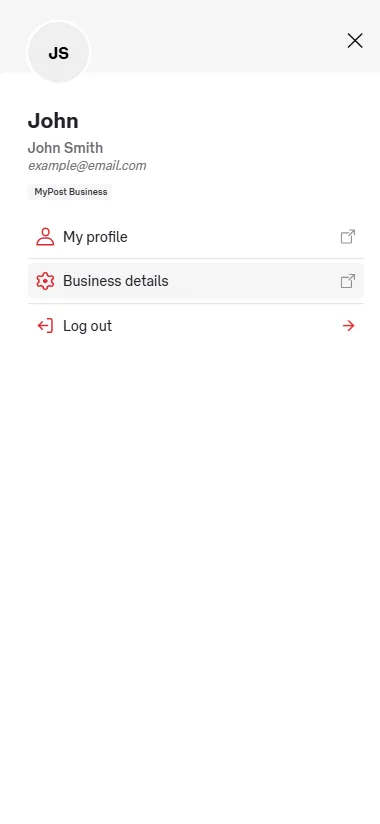
For MyPost Business (MPB) account holders, your Australia Post Business Customer Number (APBCN) is located on your MPB dashboard under your name, as well as in your Business details.
Choose whether you are using a mobile or desktop device to view screenshots.
Directly below your name, you'll see Australia Post Business Customer Number (APBCN) followed by the number itself. Copy this number into your Zonos Dashboard.
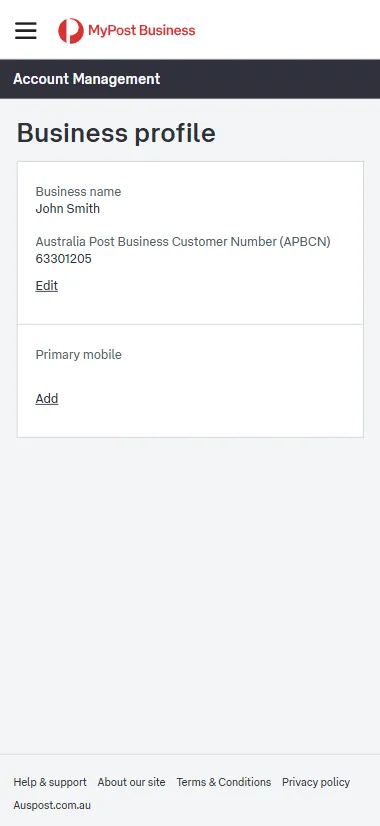
Additional view: The APBCN is also visible within your Business details. Click on the three lines in the top left corner to open your menu. Once in the menu, select Business details.
Within your Business details, select Business profile, then you'll see Australia Post Business Customer Number (APBCN) followed by the number itself. Copy this number into your Zonos Dashboard.
Where do I find my MLID?
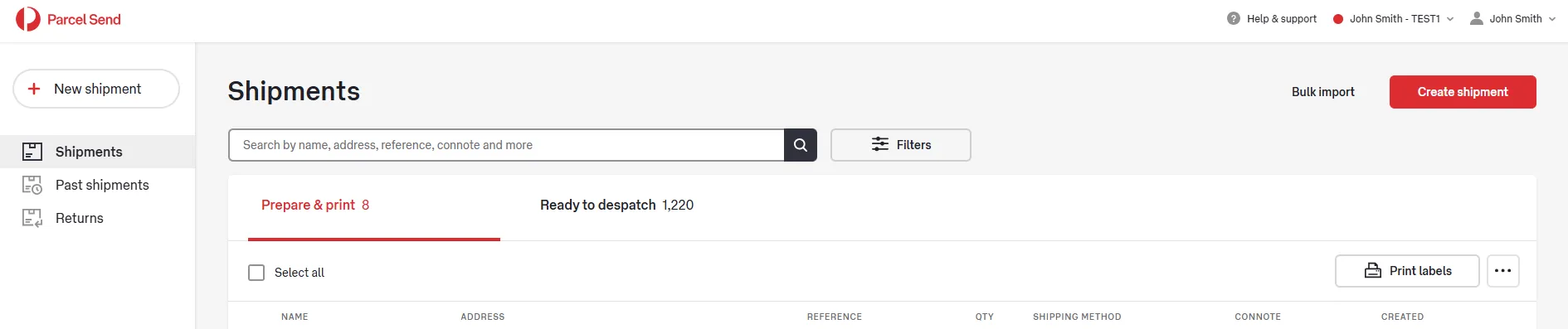
For business contract customers, your Merchant Location ID (MLID) can be located using the screenshots below, or obtained by contacting your Australia Post account manager.
Your MLID appears in the screen proceeding the log in to Parcel Send screen. Your MLID appears in the top right of your screen and in this example is made up of the letters following "John Smith -", the example account name. In the below example the account's MLID is "TEST1".
Do I still need a Zonos Verified Account if I am already integrated via APIs or platform partners?
Yes, but you do not need to go through the registration process again. You'll create a second, connected Dashboard account for your Verified Account. To do so:
- Log into your Zonos Dashboard, then click on the Integrations tab.
- Click the Connect an account button in the top right.
- Select Australia Post in the list of available integrations.
- You'll be prompted to enter your Australia Post shipper number (MLID or APBCN).
- Click Setup integration to create the second Verified Account.
This second Verified Account will be connected to your existing Zonos account. Any orders placed via your ecommerce website using Zonos' integration will only appear on the ecommerce Dashboard account that you are used to. If you ship other orders (such as those you receive through a different selling platform, not integrated with Zonos) with your AusPost business account, they will appear on your Verified Account Dashboard. You can easily toggle between the two accounts by clicking the name of your account in the top right corner of Zonos Dashboard.
Can I have multiple Zonos Verified Accounts linked to one Australia Post account?
Yes, you can add additional Verified Accounts (with different shipper identifiers) to one Australia Post account. You can link new shipper identifiers by going to Settings → Australia Post shipper identifier. If you would like to create a second Australia Post account, reach out to our support team at support@zonos.com to explain your use case.
Why did Australia Post partner with Zonos?
Postal operators like Australia Post must work with an approved third-party to comply with US CBP requirements.
Zonos is one of the first qualified third parties approved by US authorities. Australia Post partnered with Zonos to enable resumption of services to the US as soon as possible.
What will I be charged by Australia Post and Zonos?
There are no additional Australia Post fees.
Business customers with a Zonos Verified Account are invoiced directly by Zonos for:
- Duties (based on COO)
- Postal clearance fee (which varies by post and can be viewed in your Dashboard's Billing Settings, under Plan.)
There are no subscription or hidden charges.
Does the Zonos handling fee apply per item in a parcel?
No. The postal clearance fee is applied per parcel, not per individual item.
Who should I contact for help with my Zonos Verified Account or billing?
Contact the Zonos support team, available 24/7, for assistance: :e-mail: APsupport@zonos.com
As a Verified Account, what do I have access to?
- Item Quoter
- Orders (order history)
- Invoices
- Shipments (shipment history)
- Settings (business info, billing info, account key, team members)
Do I have to pay a subscription fee for a Verified Account?
No. Zonos Verified Accounts are free to use. You will only be billed for duties and clearance fees per shipment.
What systems can I use to print Australia Post labels with a Verified Account?
You can use the same systems you use today. Shipment data will be shared with Zonos so duties and fees can be billed.
How much does it cost to use a Verified Account?
There is no subscription fee, and no cost for tools like Item Quoter. You are billed only for duties and clearance fees per shipment.
When will I see my shipment in Dashboard?
Shipments appear once Australia Post sends data to Zonos. This can take a few days after you ship.
I don't see my Account Key. How do I get it?
While it is beneficial to confirm you have an account key, the integration with AusPost does not require you to enter your Account Key anywhere. We use your MLID, APCN, or APBCN to link your Verified Account to your Australia Post account.
There are a couple of reasons you may not see your Account Key:
- Your Account Key won't appear until you have added your billing information to Dashboard. Please ensure you have added your billing information, then it should appear in Dashboard -> Settings -> Integrations (if you do not have a payment method on file, you will be prompted to add one).
- The other common reason you may not see your Account Key is if you have an existing account with Zonos, that is not a Verified Account. Contact our support team at support@zonos.com and we can switch your account to a Verified Account.
Can I use my Verified Account for shipments over $2,500 USD?
No. As of July 24, 2026, the duty prepayment threshold has risen from $800 to $2,500 USD. Shipments over $2,500 USD follow existing processes and are not affected by the Executive Order.
Are postal shipments subject to MFN, Section 301, Section 232, and/or Section 122 duty rates?
Before July 24, 2026, U.S.-bound postal shipments were only subject to Section 122 tariff rates—they had a temporary advantage where other normal duties (MFN, Section 301, Section 232, etc.) did not apply. As of July 24, 2026, that advantage is gone, and Section 122 tariffs have expired. Postal shipments are now subject to normal duties (MFN, Section 301, Section 232, etc.), for the first time. In addition, a new Section 301 forced-labor tariff (10% or 12.5% by country of origin; some origins are capped net of the MFN rate — see the U.S. tariff tracker) now applies to postal shipments, with a clean cutover from the expired Section 122 tariff rate to the new Section 301 rate.
What if a platform or merchant uses a provider other than Zonos for duty calculation?
Not an issue. Zonos collects and remits duties for eligible Australia Post shipments, even if another provider calculated the duty estimate. You'll be invoiced by Zonos for the actual duties.
If a postal shipment contains multiple items with different countries of origin, how are duties calculated?
Duties are calculated per item based on country of origin, then aggregated for the shipment total. The full amount appears on your Zonos invoice.
How are gifts over USD$100 handled?
Gifts over USD$100 are dutiable. Zonos calculates duties on the full value and bills your Verified Account.
What if a gift includes multiple items with different countries of origin?
Duties are calculated per item based on COO, then aggregated for the shipment total. The total is billed to your Verified Account.
Why are there duties on returns?
According to CBP, U.S. returns are not duty-free and require duties to be paid.
There are a couple of exceptions where returns are exempt from duty:
- Un-deliverable items with the original U.S. S-10 Bar code and the package intact
- Refused items with the original U.S. S-10 Bar code and the package intact
What if I use a 3PL? Who should set up the Verified Account?
- If your 3PL allows you to bring your own Australia Post account (BYOA), then you should set up a Verified Account with Zonos for your Australia Post account.
- If your 3PL allows you to use their AusPost account, then the 3PL needs to add your shipper identifier (MLID, APCN, or APBCN) to their Zonos Verified Account via Settings → Australia Post shipper identifier.
3PLs should not ask merchants to create a Verified Account with the 3PL's MLID, APCN, or APBCN.
Why do I need to provide U.S. product data now when I haven't had to before?
Because the postal channel is being brought in line with commercial shipping. Importers using commercial carriers have supplied this kind of product detail for years, while postal parcels moved under a simpler process that did not ask for it.
Three changes closed that gap:
- Section 232 tariffs, which cover goods including steel, aluminum, and pharmaceuticals, began applying to postal shipments on July 24, 2026; for metal goods, the rate depends on where the metal was originally made.
- U.S. agency review, from bodies such as the FDA and CPSC, reaches postal shipments on October 22, 2026, and can start applying sooner.
- Free trade agreements became available to postal parcels under $2,500 USD for the first time, including U.S.–Australia, and claiming a rate requires supporting documentation.
Nothing about your products has changed. What changed is how much detail U.S. entry asks for when a parcel arrives by post.
Do I need a Verified Account just for these new data-collection tools?
If you're shipping parcels under $2,500 USD to the U.S. via Australia Post, you already need a Verified Account to prepay duties—that hasn't changed. What's new is that the same free account now also gives you Catalog, Zonos Clarify, and document upload, so there's nothing extra to sign up for or pay for.
What does it cost to use Catalog, Clarify, and document upload?
Nothing. There is no subscription fee and no per-shipment charge for Catalog, Zonos Clarify Zonos AI, or uploading documents. They're included in the same free Verified Account you use for AusPost billing.
How do I know which of my products need more data?
You do not have to work it out yourself. Once your products are in your Catalog (via Zonos Sync or a CSV upload), Zonos flags the ones that need attention, with the reason attached—melt and pour data, or FDA details.
This is the main reason to connect your Catalog early: until your products have been assessed, you will not know how much of your range the new requirements actually touch.
What happens if my product names don't match the goods description on my AusPost shipment?
The shipment is handled as though you never provided the extra information, because nothing connects the shipped goods to the product you documented with Zonos.
The product name in your Catalog has to match the goods description you send with the customs data exactly—same wording, same abbreviations, no extra or missing characters. If you find a mismatch, correct the product name in your Catalog to match what your shipping system actually sends.
Can I connect my store instead of uploading a CSV?
Yes, using Zonos Sync. Etsy, eBay, and WooCommerce connections are available now, followed by Amazon, Shopify, BigCommerce, and more.
Zonos Sync pulls your products and orders into your Catalog automatically and keeps it current as you add and change products. CSV upload works for any platform, and it is the route to use if yours isn't connected yet.
Starting with a CSV is not wasted work either—products you upload keep their details if you connect a store later.
What is Zonos Clarify Zonos AI?
Clarify Zonos AI identifies the additional product-specific details a given item is required to provide, and asks you for them.
That is the gap it fills. Requirements sit with different U.S. agencies and vary product by product, so checking a whole catalog yourself is a slow job—which is why most shippers are supplying nothing, not because they are unwilling. Clarify Zonos AI works it out per product: a cosmetic draws FDA questions, a children's toy draws CPSC questions about materials and small parts.
It also infers the likely answers from the product information you already have, so you can move through a lot of products quickly—reviewing what Zonos proposes and correcting anything that needs it before you submit, instead of selecting every answer for every product. Every answer is saved to the product and reused.
What documents can I upload, and which trade agreements are supported?
You can upload certificates of origin, metal origin documentation for Section 232 metal goods (country of melt and pour for steel, country of smelt and cast for aluminum), and free trade agreement documentation.
Supported agreements at launch: USMCA, U.S.–Australia, U.S.–Korea, and U.S.–Israel.
Documents can be attached at the organization level or linked to specific products, so one certificate can cover everything it applies to.
What is a PGA, and why does it matter to a postal shipment?
A partner government agency (PGA) is a U.S. agency other than CBP with authority over what may be imported—the FDA for food, drugs, and cosmetics, the CPSC for consumer products, and others.
PGA review has applied to commercial shipments for years. As of October 22, 2026 it reaches the postal channel, which means a regulated product may need additional data before it can be entered.
What is country of melt and pour, or smelt and cast, and why is Zonos asking for it?
It is where the metal in a product was originally made, which is frequently not the country the finished product was made in. Steel uses the country of melt and pour. Aluminum uses the country of smelt and cast. Copper reporting begins July 30, 2026.
Reporting it is mandatory on goods subject to Section 232, and the cost of not having it is severe: aluminum declared with an unknown country of smelt or cast is charged 200%, the rate applied to Russian metal.
It is also worth knowing that Section 232 duty is charged on the full customs value of an article, not on the value of the metal inside it. So this data is not about shrinking the amount that gets taxed; it is about not being charged a punitive rate, and about qualifying for lower tiers where you can. Recording it once, per product, means every shipment carries the right answer.
Keep shipping to the U.S. with Australia Post + Zonos
The U.S. is starting to require more than just prepaid duties on postal shipments—they're also requiring additional product-specific data on about 48% of shipments. Examples include origin and content details for certain metals and pharmaceuticals (Section 232) and data that the FDA, CPSC, and other U.S. government agencies require. There is also a benefit: free trade agreements can apply to postal for the first time (but need documentation and approval). Australia Post shippers get free Zonos tools to handle it all, including the $2,500 USD duty prepayment threshold that took effect July 24, 2026 and the new product data requirements.
Start today